What is a work timeline?
Updated on 8 October 2026
A work timeline is a detailed, AI-written record of the workday: which apps, what was done, how long it took and how productive it was. ScreenJournal builds one for every person automatically, and everything else (timesheets, reports, the chronicle) is generated from it, and standups are drafted from it on request.
What does a work timeline show?
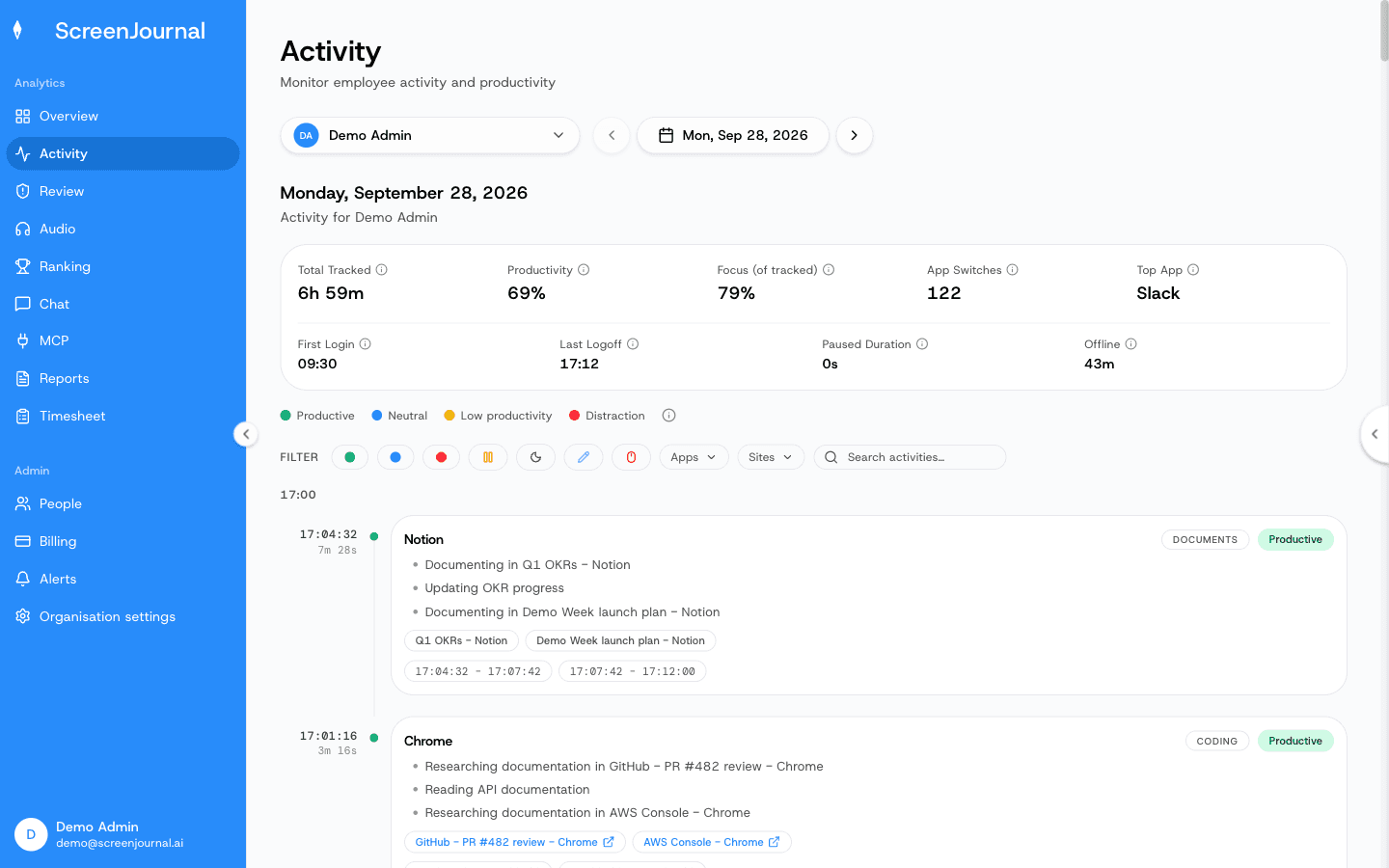
Each entry on a work timeline shows the app the work happened in, a plain-English summary of what was done, how long it took and a productivity score. Entries are grouped into sessions across the day, so the timeline reads as the story of a workday rather than a list of application names.
The difference from a conventional daily work log is who writes it and from what. Nobody fills a work timeline in. ScreenJournal writes it from the work itself, so an entry reads "prepared the March invoice run and corrected two rate mismatches" with an app badge and the real duration against it, not "spreadsheet, 9:14 to 10:02". Expand an entry and the context behind the summary is there for anyone who needs the detail.
Proof: the Activity page, one person's day as scored segments with the app, time range, duration and an AI-written description; hover a segment for Correct score, Play recording and Redact, each gated by role and policy.
How does ScreenJournal build a work timeline?
ScreenJournal builds the timeline in three steps. It records screen activity as short-lived video while work happens. A frontier AI model analyses that video to understand the work and measure output. By default the video is then deleted immediately during processing, and the timeline is what remains. Where a manager needs video evidence they can opt in to keep the recordings for the organisation or a team, in what this site calls Evidence Mode, stored for up to 3 months; a Play recording action then appears on those segments.
This is derive-and-discard: the screen is read only long enough to derive understanding, then the footage is discarded. Apps and sites on the organisation's privacy exclusion list, such as banking, payroll, HR and health, are never captured. Keystrokes are not logged at any point, because ScreenJournal reads work output, not typing.
Writing the timeline from the work itself also makes it hard to cheat. Activity percentages built from mouse and keyboard input can be gamed with a jiggler; a timeline built from output cannot, because motion is not work and the timeline only records work.
What does the productivity score mean?
The score on each timeline entry measures the work in that entry, not how busy the apps looked. It is derived from what was actually done, so time spent in the right application does not raise it by itself. Every employee sees their own scores, and an admin can correct a segment the AI misread, or set a standing correction rule for an app or site. Alerts are off until an admin writes a rule, so the timeline informs managers rather than pestering employees.
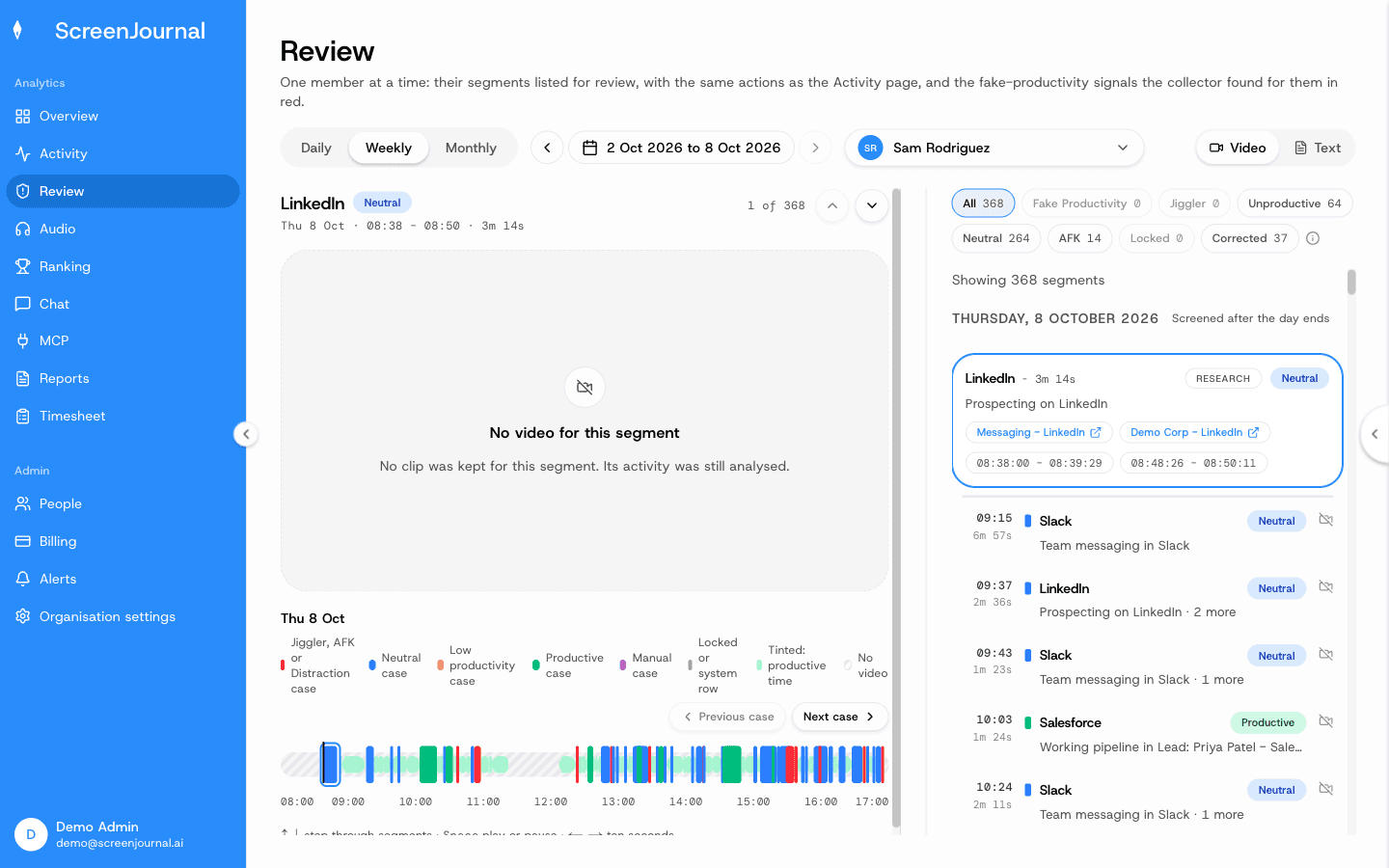
Proof: the Review page, listing one member's fake-productivity, jiggler, unproductive, neutral, locked, untracked, manual and corrected segments by case, with a player beside the list where recordings are kept and Correct score, Play recording, Redact and Add reason on each.
What stays private on a work timeline?
Excluded apps and sites stay private, along with anything the organisation allows an employee to redact. Apps and sites on the privacy exclusion list, such as banking, payroll, HR and health, are never captured, and a gap an employee explains on their own timeline can be saved as Personal, which counts as neutral time. Redaction permanently deletes a segment from the timeline and every derived report; who may redact is a permission the organisation's administrators grant, and nobody has it until they do. PII is removed during processing, and there is no second, secret view: employees see the same activity view managers do.
One kind of segment cannot be redacted: a segment already retained as evidence for an alert stays in the record. Everything else follows the privacy-first flow, and by default there is no footage to fall back on, because the raw screen data is deleted during processing.
Proof: the Activity page, one person's day as scored segments with the app, time range, duration and an AI-written description; hover a segment for Correct score, Play recording and Redact, each gated by role and policy.
What does ScreenJournal generate from work timelines?
Timesheets, reports, answers and the chronicle: everything else in ScreenJournal is generated from the timeline. The Timesheet page turns tracked hours into pay per person per week or month, with each day opening into the segments behind it. Reports come from the same record: the Overview dashboard, the weekly Ranking and Excel workbooks for productivity, attendance and app usage. The Assistant chat (Ask AI) opens beside any page and answers from the derived data, never from footage. And over time, timelines accumulate into the work chronicle, a searchable history of the team's work, queried through chat or MCP and permission-scoped by role.
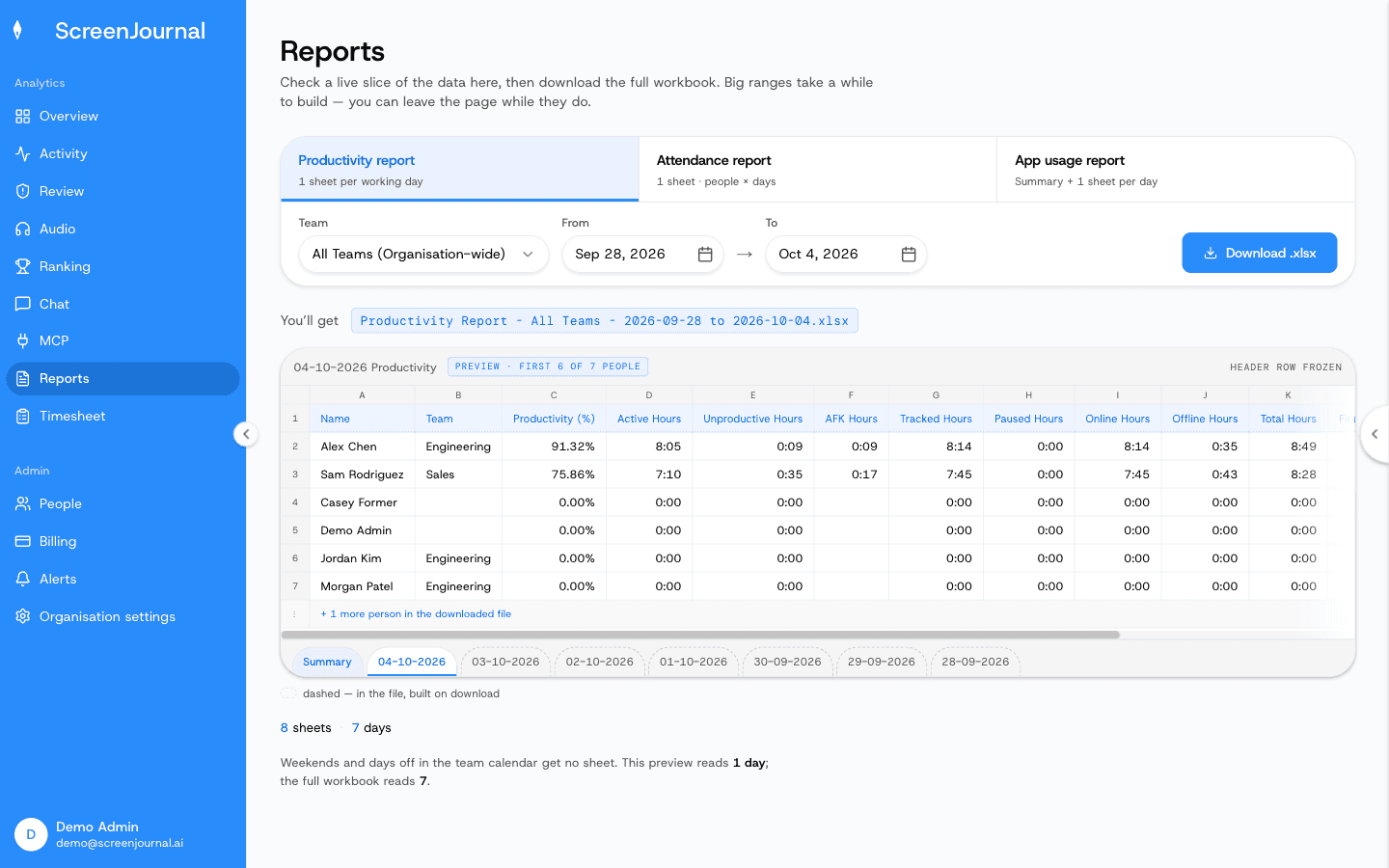
Proof: the Reports page, with the report chooser, scope and date range, and a live preview of the workbook before download.
What did my team do today?
That question is the reason work timelines exist, and it has a direct answer: open the Activity page and read each person's day as scored, plain-English entries, or ask the built-in chat and get the summary in seconds. By default there is no footage to scrub, and there is nothing to interpret either way, because the interpretation happened when the timeline was written.
Who are work timelines for?
Work timelines suit any industry where work happens on a computer. Managers of remote, hybrid, offshore and BPO teams get an accurate record of what was actually done, without watching screens or scrolling screenshot archives. Employees get their real output recognised: someone who ships excellent work in two focused hours is finally visible, and someone gaming a timer is not. If you are weighing this approach against screenshot trackers, surveillance suites or activity analytics, see ScreenJournal vs the alternatives for the honest comparison.
Frequently asked questions
Can employees see their own work timeline?
Yes. Employees see the same activity view managers do, including every entry, duration and score. Scores are not final: an admin can correct a segment the AI misread directly from the timeline, and standing correction rules fix an app or site's score going forward.
Can an employee hide personal activity from their timeline?
Partly. Apps and sites on the organisation's privacy exclusion list are never captured, and a gap an employee explains on their own timeline can be saved as Personal, which counts as neutral time. Employees can also redact segments when the organisation grants them that permission; a redacted segment is erased entirely and never appears in anyone's search. Only a segment already retained as evidence for an alert cannot be redacted.
How is a work timeline different from a time tracker's activity log?
A time tracker logs hours and an activity percentage calculated from mouse and keyboard input, which says nothing about what was produced and is easy to fake with a jiggler. A work timeline records the work itself: what was done, in which app, for how long, with a productivity score.
What is ScreenJournal?
ScreenJournal is an AI work visibility tool that reads on-screen work as it happens, turns it into a detailed timeline of what each person actually did, and then, by default, deletes the raw screen data. Timelines accumulate into a searchable chronicle of everyone's work history, and from them ScreenJournal generates timesheets and reports automatically and drafts standup summaries on request, answering questions about any of it in plain English.
See the work itself, not screenshots of it
Timesheets, reports and answers from the work your team actually did. Available for Windows and macOS, with Linux and mobile support coming soon.