What is a work chronicle?
Updated on 14 September 2026
A work chronicle is a searchable history of everything a team actually did, written by AI from the work itself. With ScreenJournal, employees search their own past, colleagues learn how another team does a job, and departments get answers by asking instead of interrupting. By default the footage is gone; the knowledge stays.
How does the work chronicle work?
The chronicle is every work timeline, kept and made searchable. It builds in three steps. Each day, ScreenJournal reads on-screen work as it happens and writes each person's timeline: plain-English entries with the app, what was done, how long it took and a score. By default the raw screen data is deleted during processing, so only derived insight moves forward; where a manager has opted in to keep video evidence, in what this site calls Evidence Mode, those recordings are stored for up to 3 months. Those timelines then accumulate into the chronicle, a permission-scoped history the team can question through the ScreenJournal chat or MCP.
Nothing extra has to be written down for the chronicle to exist. It is a by-product of the work having happened, which is what makes it different from every knowledge base that depends on someone remembering to document.
Can I search my own work history?
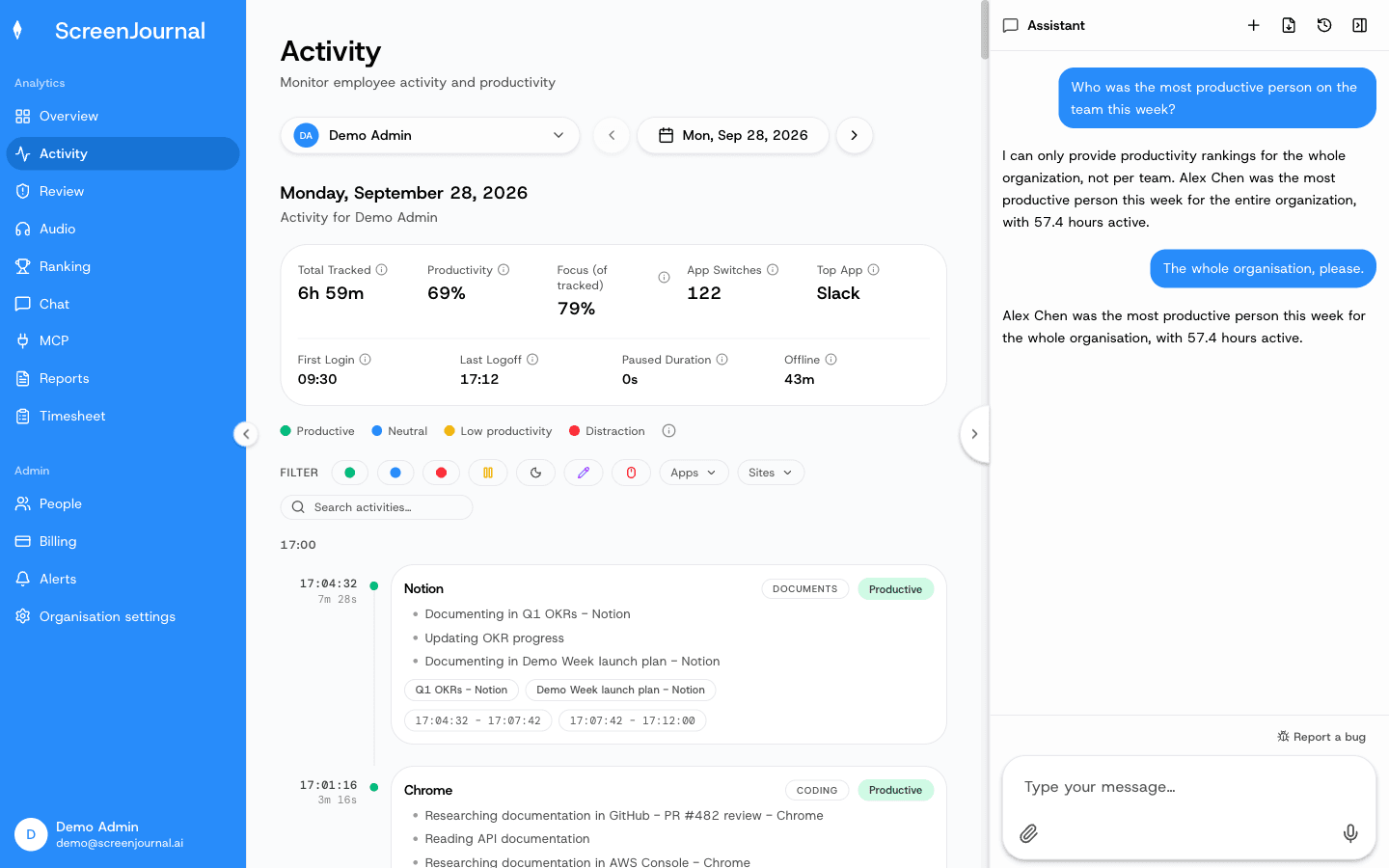
Yes, in plain English rather than by date. Ask "what did I work on last month", "where did I fix that webhook bug" or "how did I handle the Q2 price change" and the answer comes back from your derived work history, with the context to drill further. What is searchable is the understanding of the work, not screenshots: by default the footage was already deleted when each timeline was written.
That changes what your past work is worth. How you solved a problem last quarter stops being a memory exercise or a dig through old tickets and chats; it is findable by asking.
Proof: the Assistant chat (Ask AI) open beside the dashboard, showing the data it consulted before answering.
How do colleagues learn from the chronicle?
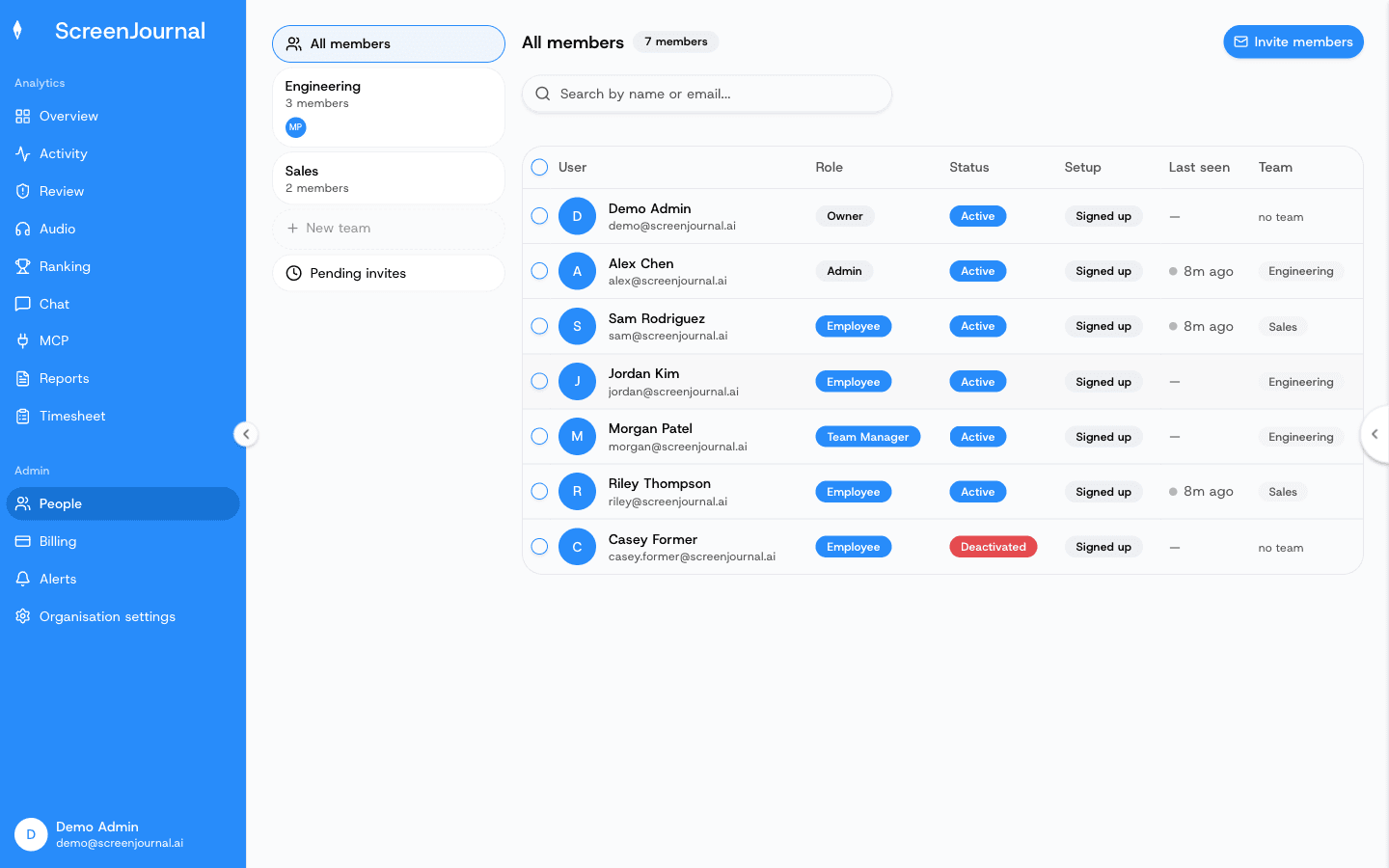
By asking, within what their role allows. Chronicle access is permission-scoped by role, and inside those bounds colleagues can learn how another person or team does a piece of work without booking a meeting. Support can check how engineering shipped a fix. An account manager can see how the last renewal of this shape was handled. A team in one country can read how their counterparts run the same process. Cross-department questions get answered by the chat or MCP instead of interrupting someone's day, so knowledge moves without another recurring meeting.
Proof: the People page, where each member's role sets what they can see.
Can new starters onboard from the chronicle?
Yes. A new hire can learn from how the work is actually done, rather than from documentation about how it was once done. Wikis and process documents go stale the moment a process changes; the chronicle is written from the work itself as it happens, so "how do we actually process invoices" has a current answer drawn from real invoices being processed. The new starter asks, reads how the team genuinely works, and puts the follow-up question to the chat instead of to a busy colleague.
Is a work chronicle the same as organisational memory software?
It is organisational memory built from the work itself rather than from what people remember to write down. Traditional organisational memory and knowledge sharing tools depend on contribution: someone must document the decision, update the wiki, file the summary. The chronicle depends only on the work having happened. The result is a memory that stays current by default and is searchable by meaning, kept after the footage that produced it is gone.
What does the chronicle keep, and what does it never keep?
It keeps the derived understanding of the work, not the raw material it came from. Retention is bounded too: the chronicle keeps the most recent 12 months of derived work history. This table lists both sides.
| Kept in the chronicle | Never in the chronicle |
|---|---|
| Plain-English timeline entries: the app, what was done, how long it took, the score | Screenshots or screen video: raw screen data is deleted during processing by default, and opted-in video evidence is replayed from timeline segments, not searched |
| The searchable history those entries build up | Keystrokes: never logged in the first place |
| Permission-scoped answers through chat and MCP | PII: removed during processing |
| Segments retained as alert evidence, exempt from redaction | Excluded apps and sites: never captured in the first place |
| Entries an employee has redacted: erased entirely |
Redaction is respected in the chronicle as everywhere else: a redacted entry is erased entirely and never appears in anyone's search, and excluded apps and sites were never captured. Because by default no footage sits behind the record, there is no archive to secure, review or leak; the record is the understanding itself.
Proof: the Assistant chat (Ask AI) open beside the dashboard, showing the data it consulted before answering.
Who is the work chronicle for?
Anyone whose work happens on a computer, in three directions at once. Employees get their own past made findable, which turns being observed into something that gives back. Managers can trace how something was actually done without reconstructing it from messages and memory. Teams get fewer interruptions, because the routine "how did you do that" questions go to the chat instead. No screenshot tracker offers an equivalent: a screenshot archive is typically searchable by date at best, and a surveillance recording answers nothing until someone sits and watches it. For the full picture, see ScreenJournal vs the alternatives.
Frequently asked questions
Can ScreenJournal tell me what I worked on last month?
Yes. Ask the chat "what did I work on last month" and it answers from your derived work history, with the detail to drill into specific days or projects. By default the raw screen data behind that history was deleted during processing; what you are searching is the understanding of the work, not screenshots.
Can other people see entries I have redacted?
No. Redacted entries are erased entirely, and excluded apps and sites were never captured. Chronicle access is permission-scoped by role, so colleagues and managers only ever see what their role allows.
How long does the work chronicle keep history?
The chronicle keeps the most recent 12 months of derived work history. The limit applies to the derived record only. Raw screen data is not kept by default, because it is deleted during processing; where a manager has opted in to keep video evidence, those recordings are stored for up to 3 months.
Does the work chronicle store screenshots?
No. The chronicle is a derived record: plain-English timeline entries with apps, durations and scores. By default raw screen data is deleted during processing, so there is no screenshot or video archive to search, secure or leak.
What is ScreenJournal?
ScreenJournal is an AI work visibility tool that reads on-screen work as it happens, turns it into a detailed timeline of what each person actually did, and then, by default, deletes the raw screen data. Timelines accumulate into a searchable chronicle of everyone's work history, and from them ScreenJournal generates timesheets and reports automatically and drafts standup summaries on request, answering questions about any of it in plain English.
See the work itself, not screenshots of it
Timesheets, reports and answers from the work your team actually did. Available for Windows and macOS, with Linux and mobile support coming soon.