What can my employer legally see on a work laptop?
On a company-owned laptop, an employer can generally monitor work activity for legitimate business purposes, and in many regions must give you notice first. Depending on the software installed, that can include apps, websites, files, email on company systems and the screen itself. Personal devices and accounts have stronger protection. This is general information, not legal advice.
Updated on 14 September 2026
What monitoring is generally allowed on a company laptop?
Broadly, quite a lot, provided there is a legitimate business purpose and, in many regions, notice. On company-owned equipment employers typically may log apps and websites, review email and files on company systems, and deploy monitoring software that captures screenshots or recordings, per configuration. Notice and consent rules vary sharply by region: some places require written notice of electronic monitoring, others treat a signed policy as sufficient. The safe assumption on a work laptop is that work activity is visible in some form.
What can employers generally not see?
Your personal devices and accounts, with one caveat: the protection follows the device, not the account. An employer generally has no right to monitor a personal phone or laptop that carries no company software or management profile. But personal email opened on a monitored work laptop can appear in whatever that software captures, so the protective rule is to keep personal life on personal devices. Covert monitoring and capturing the content of private communications are restricted in some regions; rules differ and change.
What does ScreenJournal let an employer see?
Derived insight, not footage by default. ScreenJournal is an AI work visibility tool that reads on-screen work as it happens, turns it into a detailed timeline of what each person actually did, and then, by default, deletes the raw screen data. Timelines accumulate into a searchable chronicle of everyone's work history, and from them ScreenJournal generates timesheets and reports automatically and drafts standup summaries on request, answering questions about any of it in plain English.
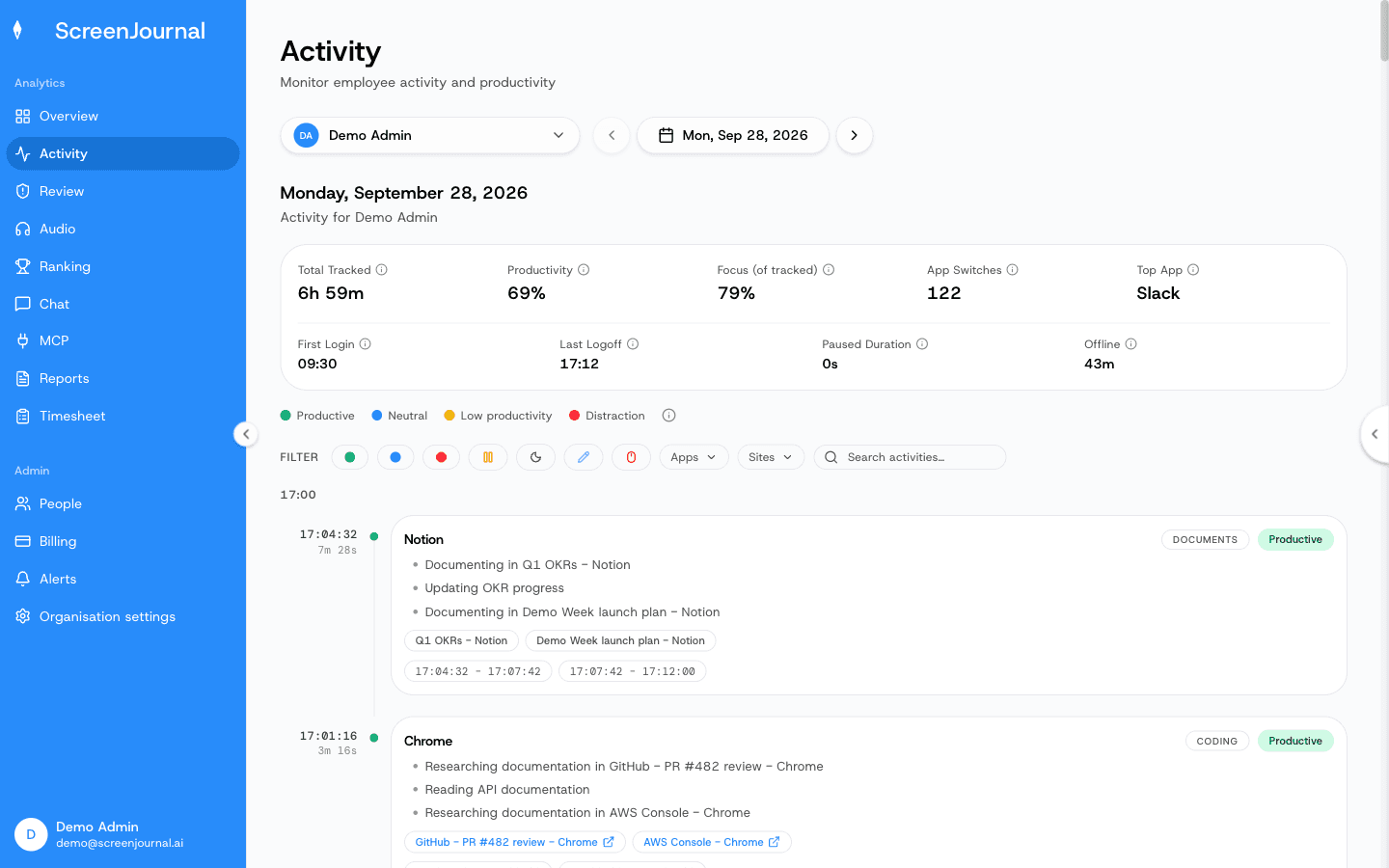
A manager sees work timelines, timesheets and reports, and can ask the AI chat questions. There are no screenshots, and by default no recordings to review, because raw screen data is deleted during processing; where a manager has opted in to keep video evidence (Evidence Mode), the people whose role already lets them see your activity can replay recordings, kept for up to 3 months. Keystrokes are never logged, apps and sites on the privacy exclusion list are never captured, and employees see the same activity view managers do and, when the organisation allows it, can redact entries first; a redacted entry is erased entirely and never appears in anyone's search, and who may redact is a permission the organisation's administrators grant. For employers, keeping less also means less exposure: there is no footage archive by default to secure, disclose or leak, a design explained in how ScreenJournal keeps employees private and compared with the alternatives in ScreenJournal vs the alternatives. Proof: the Activity page, one person's day as scored segments with the app, time range, duration and an AI-written description; hover a segment for Correct score, Play recording and Redact, each gated by role and policy.
This is general information, not legal advice; for specifics, speak to a lawyer in your region.
FAQ
Does my employer have to tell me I am monitored?
In many regions yes. Notice or consent requirements for workplace monitoring are common, and some places require written notice. Even where the law is silent, your contract and IT policy should say what is deployed, and asking HR directly is always reasonable.
Can my employer read personal email opened on a work laptop?
Possibly, depending on what is installed, since screenshot and recording tools capture whatever is on screen, per configuration. ScreenJournal skips personal activity in real time, lets you redact anything that slips through when your organisation allows it, and keeps no footage by default; a manager can opt in to keep video evidence, stored for up to 3 months.
See the work itself, not screenshots of it
Timesheets, reports and answers from the work your team actually did. Available for Windows and macOS, with Linux and mobile support coming soon.