What is AI work visibility?
Updated on 14 September 2026
AI work visibility is a category of workplace software that reads on-screen work as it happens, writes a plain-English timeline of what each person actually did, then, by default, deletes the raw screen data. Instead of storing footage or scoring busy-ness, it keeps a searchable record of the work itself and answers questions about it directly.
Managers need three answers: what is my team working on, how is it going, and where did the time go. Older tools respond with raw material someone must interpret: hours, screenshots, activity percentages, app-usage charts. AI work visibility answers the questions themselves.
What kinds of work visibility software exist?
Work visibility software falls into four camps. Screenshot trackers store periodic captures as proof of activity. Surveillance suites record everything for investigation. Activity analytics score app and website usage. AI work visibility, the newest camp, reads the work itself, keeps a derived record and, by default, deletes the footage.
Screenshot trackers such as Hubstaff, Time Doctor, Insightful and Monitask are typically timer-based tools that capture periodic screenshots and estimate effort from mouse and keyboard activity. They answer "was someone active" and leave a manager to interpret the archive.
Surveillance suites such as Teramind, Veriato and Controlio typically record screens continuously and log keystrokes, and often archive communications so investigators can reconstruct events. They are built for insider-threat and compliance investigation.
Activity analytics such as ActivTrak, WorkTime and Prodoscore measure which apps and sites were used and for how long, turned into productivity scores. Some tools in this camp describe their approach as non-invasive monitoring because they avoid screenshots and keystroke content, a genuine privacy choice. What they measure is still a proxy: time in apps rather than the work done in them.
AI work visibility is the fourth camp. It reads the work itself, writes a derived record of what was done, deletes the raw screen data by default and answers questions in plain English. ScreenJournal is the reference implementation.
The table below summarises the four camps: what each stores and what a manager gets back.
| Camp | Examples | What it typically stores | What a manager gets |
|---|---|---|---|
| Screenshot trackers | Hubstaff, Time Doctor, Insightful, Monitask | Periodic screenshots, activity percentages | Evidence to review yourself |
| Surveillance suites | Teramind, Veriato, Controlio | Continuous recordings, keystrokes | Forensic archives for investigation |
| Activity analytics | ActivTrak, WorkTime, Prodoscore | App and website usage, productivity scores | Busy-ness metrics |
| AI work visibility | ScreenJournal | Derived timelines and a searchable chronicle, no footage by default | Plain-English answers about the work |
How does AI work visibility work?
AI work visibility works in three steps: read, derive, discard. The screen is recorded as short-lived video as work happens. A frontier AI model analyses that video to understand what was done and how long it took. By default the video is then deleted immediately during processing, leaving only the derived record.
- Read. Screen activity is recorded as short-lived video, live, while the work is happening. Apps and sites on the organisation's privacy exclusion list, such as banking, payroll, HR and health, are never captured.
- Derive. A frontier AI model turns the video into work timeline entries: which app, what was done, how long it took and a productivity score. PII is removed during processing.
- Discard. By default the video is deleted immediately during processing. This read-derive-delete pattern is called derive-and-discard, and it is what separates this camp from storage-based approaches.
Timelines then accumulate into a chronicle: a searchable history of the work itself, where "how did we fix the invoice bug in March" is answered by asking, not by asking around. From the same record, timesheets and reports are prepared automatically.
What makes a tool an AI work visibility tool?
A tool qualifies as AI work visibility when it reads the work itself rather than proxies for it, keeps a derived record rather than footage, and can answer questions about the work directly. Screenshots stored for later review, or scores computed from app time alone, belong to the older camps.
- It reads the work itself. The source of truth is what happened on screen, not hours logged, input counts or app categories.
- It derives, then discards. By default raw screen data is deleted during processing, so no screenshot or video archive accumulates.
- It keeps a searchable history. Past work can be queried by meaning, not just browsed by date.
- It answers in plain English. Questions get answers through chat or MCP, not dashboards to interpret.
- It is transparent to the people it reads. Employees see what managers see and control what personal content enters the record.
What does AI work visibility look like in practice?
ScreenJournal is an AI work visibility tool that reads on-screen work as it happens, turns it into a detailed timeline of what each person actually did, and then, by default, deletes the raw screen data. Timelines accumulate into a searchable chronicle of everyone's work history, and from them ScreenJournal generates timesheets and reports automatically and drafts standup summaries on request, answering questions about any of it in plain English.
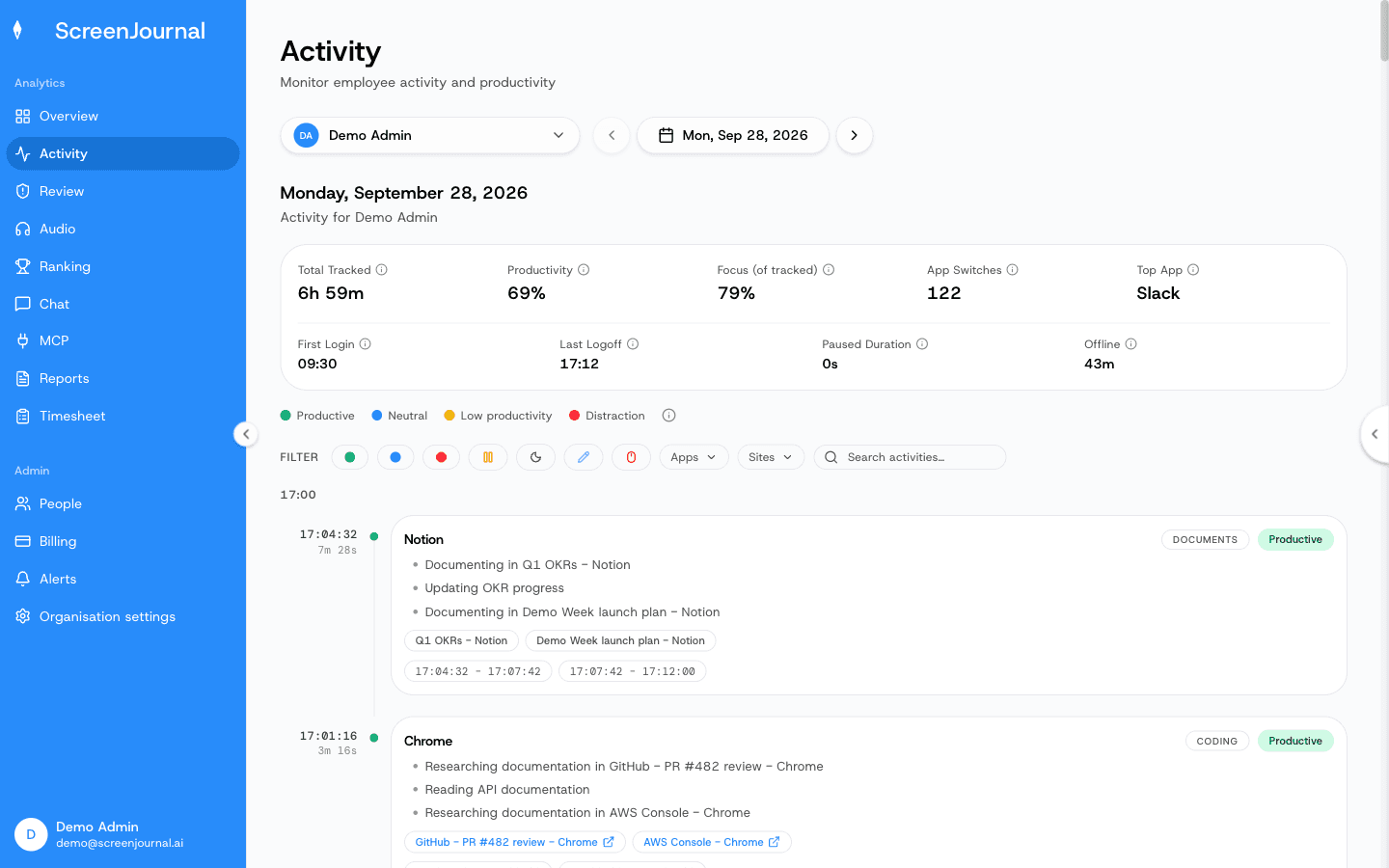
Each timeline entry carries an app badge, a plain-English summary, a duration and a productivity score, and expands for context.
Proof: the Activity page, one person's day as scored segments with the app, time range, duration and an AI-written description; hover a segment for Correct score, Play recording and Redact, each gated by role and policy.
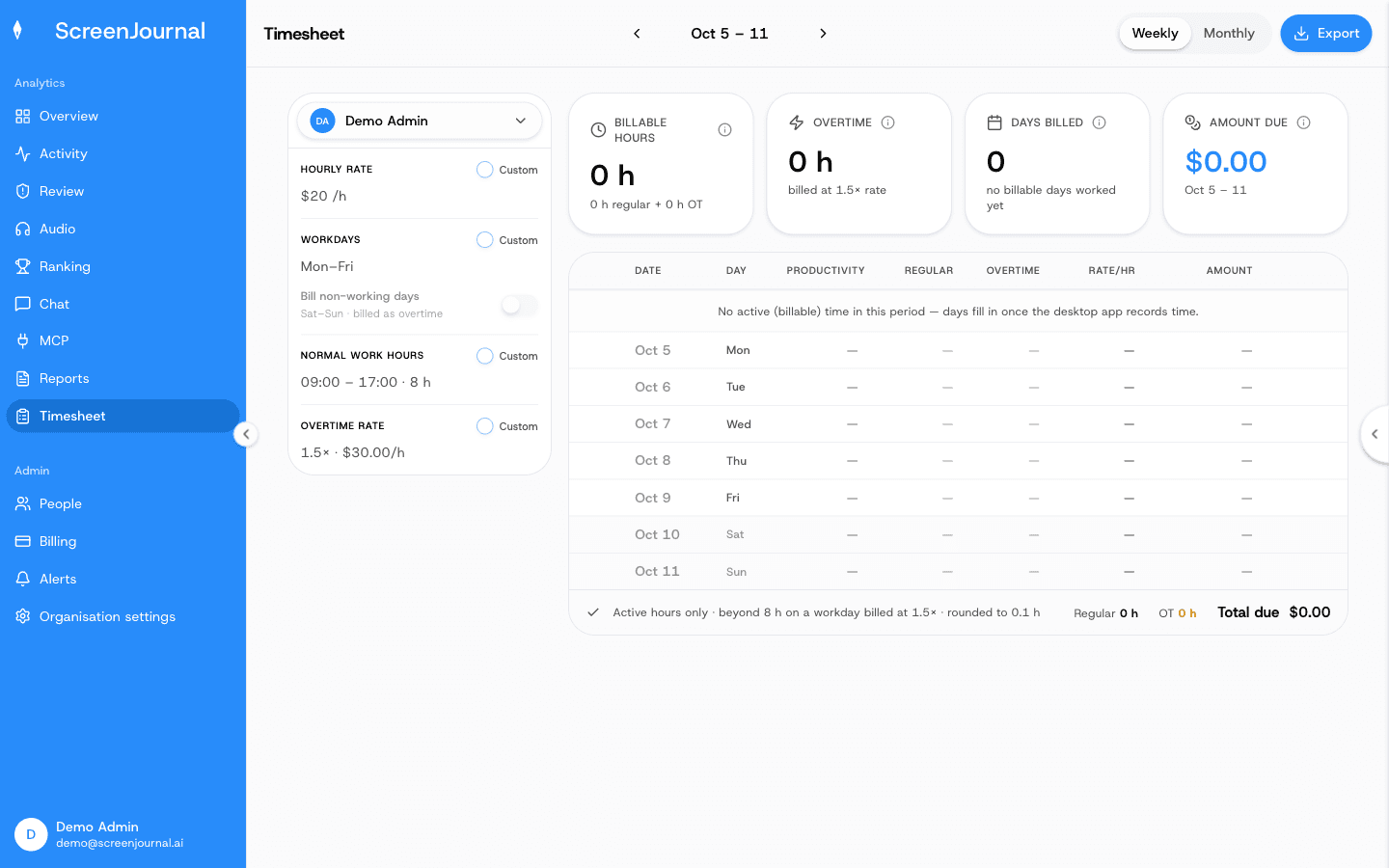
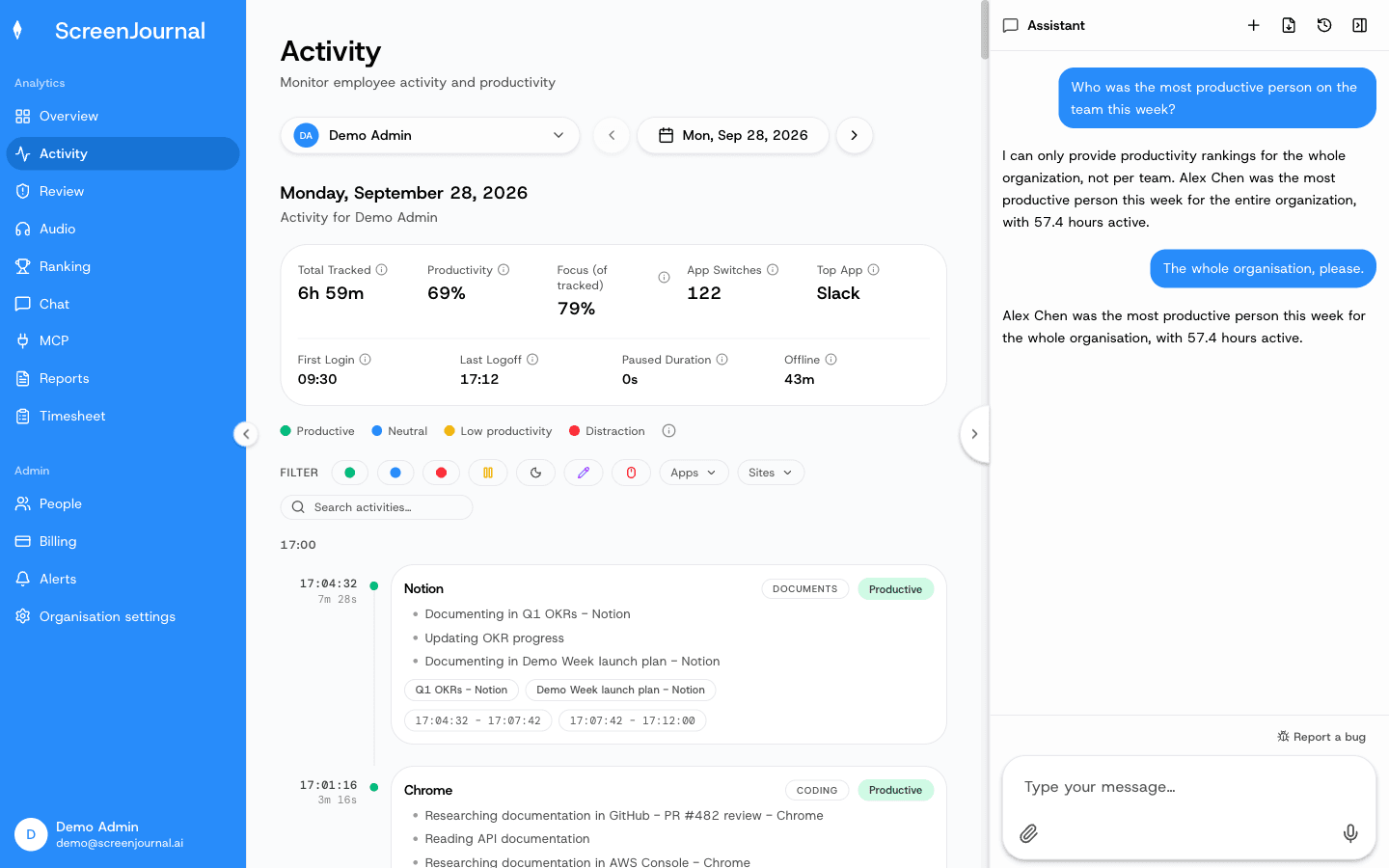
The same record does the paperwork: the Timesheet page turns tracked hours into pay per person per week or month, and the Assistant chat (Ask AI) answers questions about the work from any page.
Proof: the Timesheet page, with billable hours, overtime, days worked and amount due for one person and a row per day that opens into its segments.
Proof: the Assistant chat (Ask AI) open beside the dashboard, showing the data it consulted before answering.
Employees see the same activity view managers do. Excluded apps and sites are never captured, segments can be redacted when the organisation allows it, an admin can correct any score, and nudges are off until an admin writes an alert rule. A redacted entry is erased entirely and never appears in anyone's search; who may redact is a permission the organisation's administrators grant, and nobody has it until they do. ScreenJournal keeps no footage by default; where a manager needs video evidence they can opt in to keep the recordings for the organisation or a team, in what this site calls Evidence Mode, stored for up to 3 months.
Proof: the Activity page, one person's day as scored segments with the app, time range, duration and an AI-written description; hover a segment for Correct score, Play recording and Redact, each gated by role and policy.
Who is AI work visibility for?
AI work visibility is for any industry where work happens on a computer. It suits managers of remote, hybrid, offshore and BPO teams who need accurate timesheets and operational truth without micromanaging, and it suits employees who want their real output recognised and their work history searchable.
Teams searching for employee monitoring alternatives usually want exactly this: the answers monitoring promises, without the archive it creates.
The honest boundary: teams contractually required to keep stored screenshot evidence, or continuous forensic recordings, should look to the older camps built for exactly that. The full comparison is at ScreenJournal vs the alternatives.
Frequently asked questions
Is AI work visibility the same as employee monitoring?
No, though it answers the same management questions. Employee monitoring stores evidence, usually screenshots, recordings or usage logs, for a manager to review later. AI work visibility reads the work as it happens, keeps the derived understanding and, by default, deletes the raw screen data. It is an alternative to monitoring, built for the same job.
How is AI work visibility different from non-invasive monitoring?
They share an instinct but measure different things. Non-invasive monitoring describes tools that avoid screenshots and keystroke capture, a genuine privacy benefit. AI work visibility also avoids stored footage by default, and differs on what it measures: it reads the work itself rather than app usage, so it can say what was produced, not only how active someone appeared.
Does AI work visibility store screenshots or video?
Not by default. The transient capture is video: it is read, analysed and deleted during processing. What is stored is the derived record: plain-English timeline entries, scores and a searchable history of the work. In ScreenJournal, a manager can opt in to keep video evidence for the organisation or a team, and those recordings are stored for up to 3 months.
Can AI work visibility replace time tracking?
Yes, where time tracking exists to bill clients or verify work. Because the timeline records what was done and how long it took, timesheets are prepared from the work itself rather than a timer, and faking activity with a mouse jiggler achieves nothing.
Why is AI work visibility a new category?
Because reading work directly needs AI that can understand a screen, which has only recently become practical. The older camps store what technology could store: screenshots, keystrokes and app-usage records, proxies a human still interprets. Once the work itself can be read, the archive stops being necessary.
See the work itself, not screenshots of it
Timesheets, reports and answers from the work your team actually did. Available for Windows and macOS, with Linux and mobile support coming soon.