ScreenJournal for agencies
Updated on 14 September 2026
Agencies lose billable time to memory. Timesheets reconstructed on Friday miss the quick fixes, the extra revisions and the calls between projects, and the shortfall comes straight out of margin. ScreenJournal prepares client-billable timesheets from the work itself, so every hour is captured with the app, site and work described, ready to attribute to the right client and review.
Where do agency billable hours go missing?
Between the work and the timesheet. Agency days are fragmented across clients: a ten-minute fix for one account lands in the middle of another account's afternoon, and by Friday it exists in nobody's memory. Reconstruction rounds down, because people under-claim what they cannot precisely recall, and the missing minutes are pure margin.
Timers do not solve it, because timers depend on the same busy people remembering to start and stop them between context switches. And the traditional alternative, screenshot monitoring, costs more than it recovers in an agency: designers, writers and developers are exactly the people most likely to walk when their screens are archived, and clients do not actually want folders of captures, they want a bill they can trust.
How does ScreenJournal prepare client-billable timesheets?
From the work itself, with review instead of data entry. ScreenJournal is an AI work visibility tool that reads on-screen work as it happens, turns it into a detailed timeline of what each person actually did, and then, by default, deletes the raw screen data. Timelines accumulate into a searchable chronicle of everyone's work history, and from them ScreenJournal generates timesheets and reports automatically and drafts standup summaries on request, answering questions about any of it in plain English.
Each person's day is a work timeline: entries with the app, a plain-English description, a duration and a score. The Timesheet page turns those tracked hours into pay per person per week or month: billable hours, overtime, days worked and the amount due. Each day opens into the segments behind it, any day or segment can be excluded before it goes near an invoice, and the period exports as CSV. Per-client rates and approval flows are not built in; the CSV feeds your invoicing tool. Proof: the Timesheet page, with billable hours, overtime, days worked and amount due for one person and a row per day that opens into its segments.
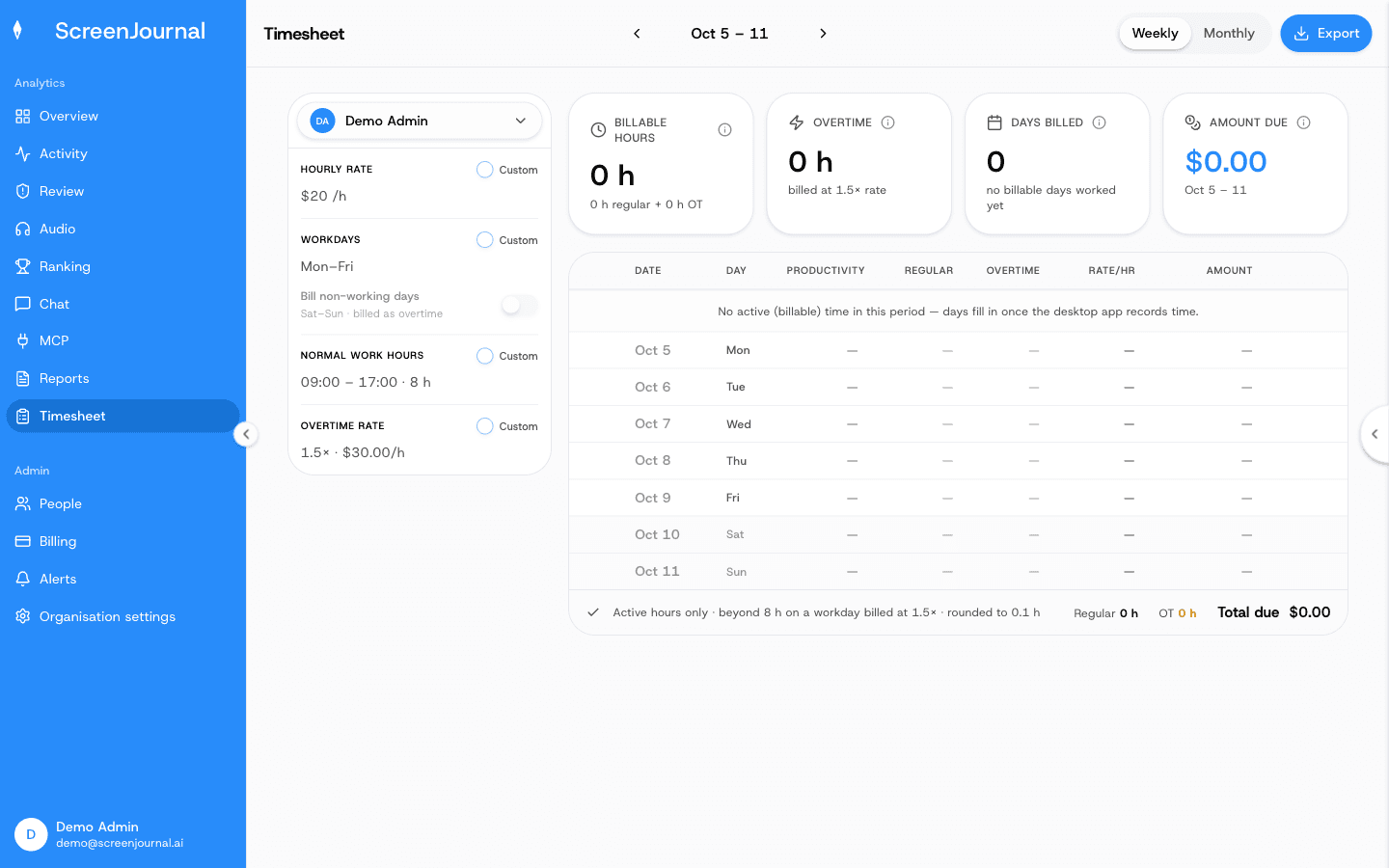
The ten-minute favour for a client mid-afternoon stops being invisible. It is on the timeline, described, timed and attributed, whether or not anyone remembered it on Friday.
How does an agency see where the hours went?
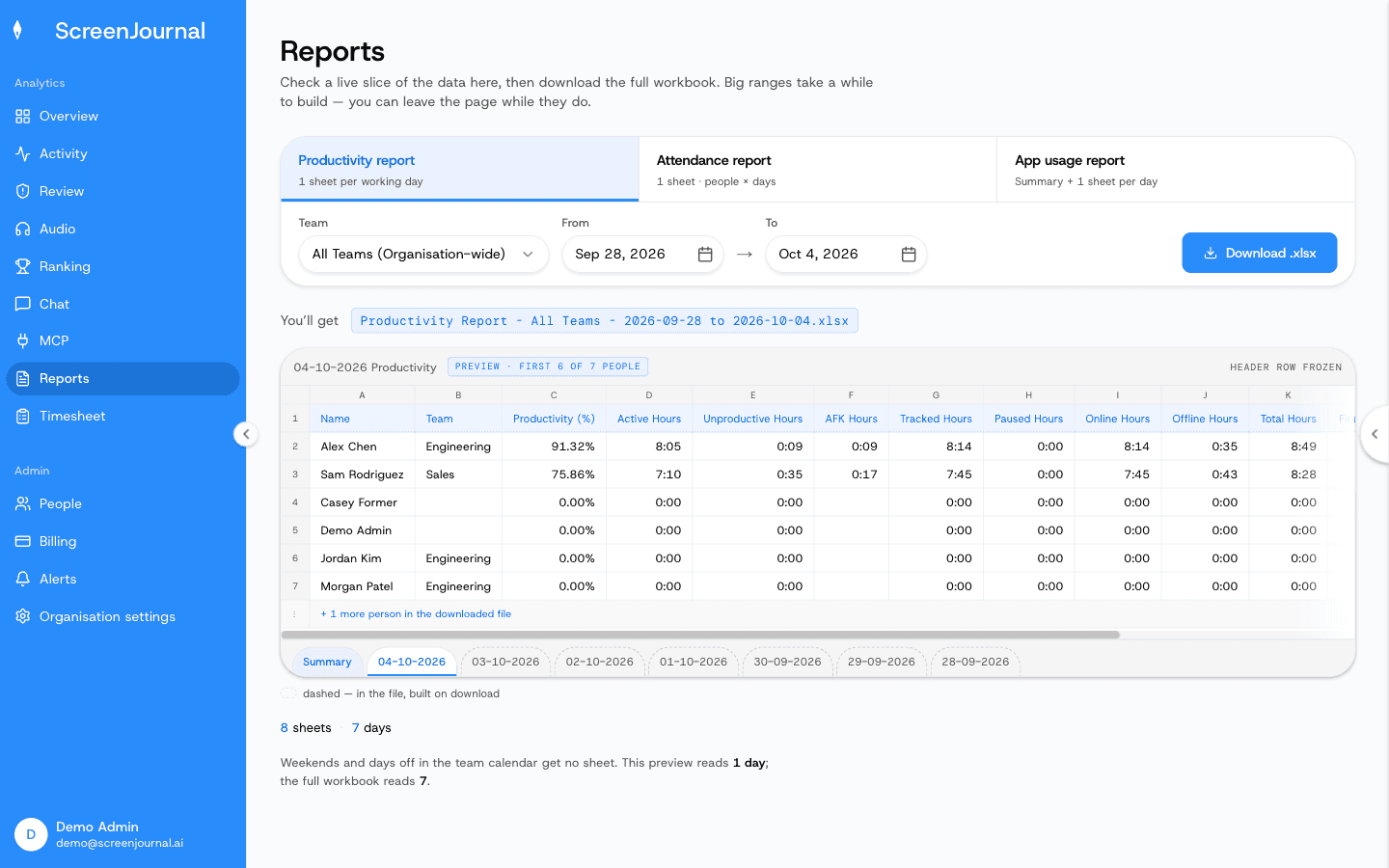
By asking. The Assistant chat opens beside any page and answers questions about the work in plain English: where this month's hours went, who is overloaded and who has room. The Overview page answers "how is the team doing" for any period, the weekly Ranking compares members, and the Reports page builds Excel workbooks for productivity, attendance and app usage. Proof: the Reports page, with the report chooser, scope and date range, and a live preview of the workbook before download.
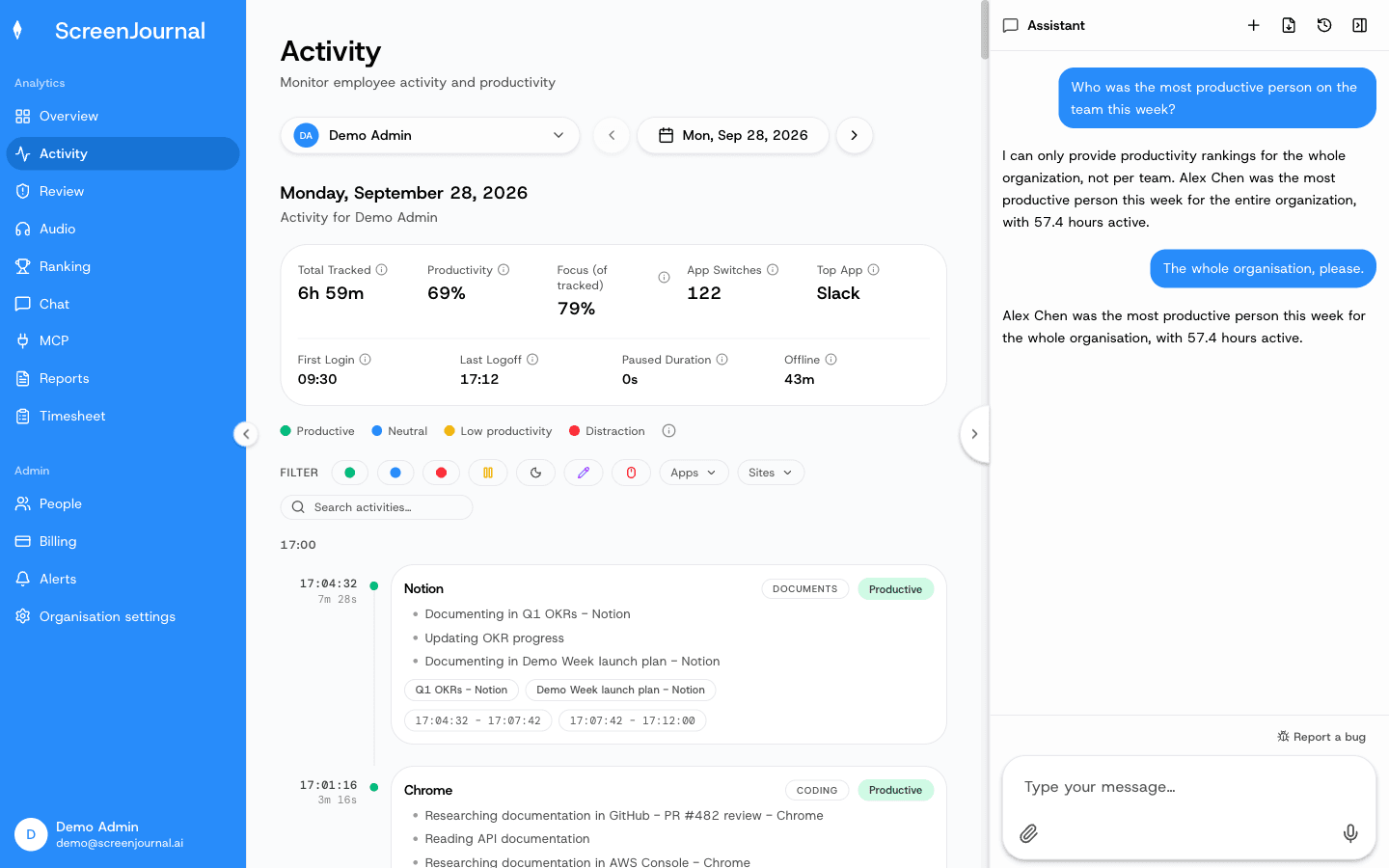
Because timelines accumulate into a searchable work chronicle, the answers reach backwards too. When a client questions a line from two months ago, or a new account manager inherits a messy retainer, the history of what was actually done is a question away, permission-scoped by role. Proof: the Assistant chat (Ask AI) open beside the dashboard, showing the data it consulted before answering.
Do creative teams have to accept screenshot surveillance?
No, and with ScreenJournal they do not accept a screenshot archive at all: by default raw screen data is deleted immediately during processing, so nobody's half-finished design or draft copy sits in an archive waiting to be judged. Where a manager needs video evidence they can opt in to keep the recordings (Evidence Mode), and those recordings are stored for up to 3 months. Apps and sites on the organisation's privacy exclusion list, such as banking, payroll, HR and health, are never captured.
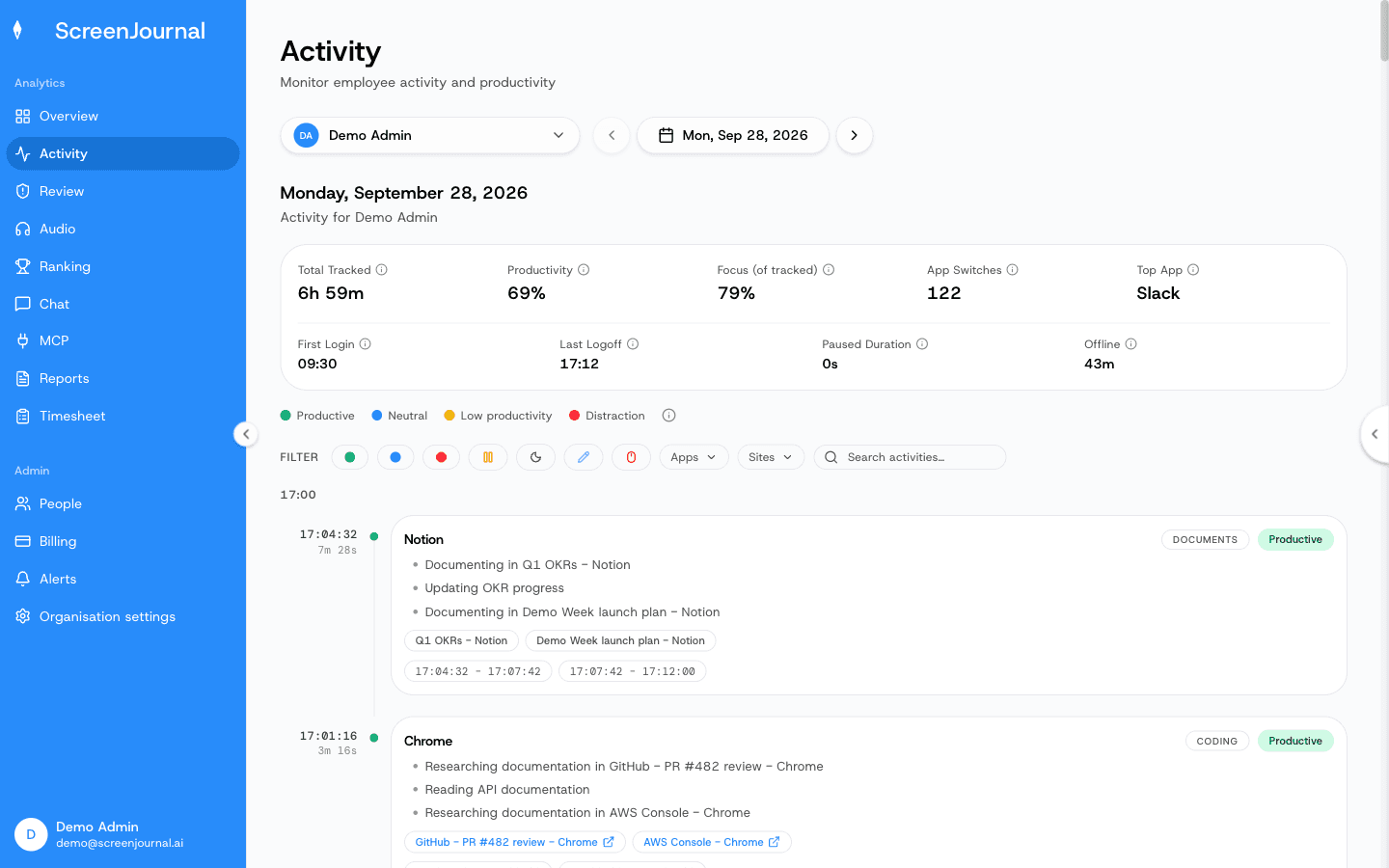
The rest of the privacy design is visible in the product. Employees see the same activity view their managers do, can redact segments when the organisation allows it, and see exactly the score their manager sees. Nudges are off until an admin writes an alert rule. For an agency, that is the difference between a tool the team tolerates and a tool that quietly drives your best people to the competitor that does not archive their screens. Proof: the Activity page, one person's day as scored segments with the app, time range, duration and an AI-written description; hover a segment for Correct score, Play recording and Redact, each gated by role and policy.
When is ScreenJournal not the right fit for an agency?
If a client contract explicitly requires stored screenshot evidence, a screenshot tracker satisfies that clause and ScreenJournal does not, because it takes no screenshots; the trade-offs are on ScreenJournal vs screenshot trackers. And a law firm whose only need is maximising captured billable time inside legal workflows is better served by a purpose-built legal tool such as Billables AI; ScreenJournal earns its place when you also want visibility, reports and answers across the whole team.
Frequently asked questions
Can ScreenJournal bill different rates for different clients?
Not yet. The Timesheet page computes each person's billable hours, overtime and amount due from one hourly rate per person (the organisation default or a custom override), with day and segment exclusions and a CSV export. Per-client rates and client or project mapping are not built in; the CSV feeds your invoicing tool.
Will clients accept timesheets without screenshots?
A timesheet line backed by a description of the work is easier to defend than an activity percentage, because the client can read what was done. Each day on the Timesheet opens into the segments behind it, with the time, the activity and its score. If a contract explicitly requires screenshot evidence, ScreenJournal is not the tool for that clause.
Do staff have to run timers or fill in timesheets?
No. The timeline is written automatically from on-screen work, and the Timesheet is computed from those tracked hours. People review their day instead of reconstructing it.
What happens when the AI puts time against the wrong client?
ScreenJournal does not allocate time to clients, so nothing lands against the wrong one. What it does is show, for every day on the Timesheet, the segments behind the hours, so a manager can exclude a segment that should not be billed before the sheet goes out.
See the work itself, not screenshots of it
Timesheets, reports and answers from the work your team actually did. Available for Windows and macOS, with Linux and mobile support coming soon.